The 60-second answer
In-house automation works well at small scale: a handful of targeted scripts, owned by the developers who built them, in low-stakes environments. The picture changes when automation becomes business-critical. Hidden costs of maintenance, documentation, credential security, audit trails, and monitoring compound with every new script. The architecture that worked for 5 automations often requires a rewrite at 50. Fortra Automate is the platform that lets your team build and run enterprise automation without building and maintaining a custom automation infrastructure. Existing scripts and tools can run inside Fortra Automate too, wrapping what your team has already built in governance, scheduling, and audit. Your best developers stay focused on what only they can do.
Where each platform fits
Both products solve real problems. The question is which problem you have.
Building in-house is the right call when
- The automation is targeted, isolated, and owned by the developers who built it
- You have dedicated developer capacity to build, maintain, and document custom integrations
- Governance, audit trails, and credential security can be added later, or are not required
- The portfolio is small enough that key-person dependency is an acceptable risk
Fortra Automate is the right call when
- Automation has become business-critical and downtime carries real cost
- You need built-in governance, audit trails, and credential security as default platform capabilities
- Your team would rather build automations than build automation infrastructure
- You need to scale from a handful of automations to hundreds without rewriting the architecture
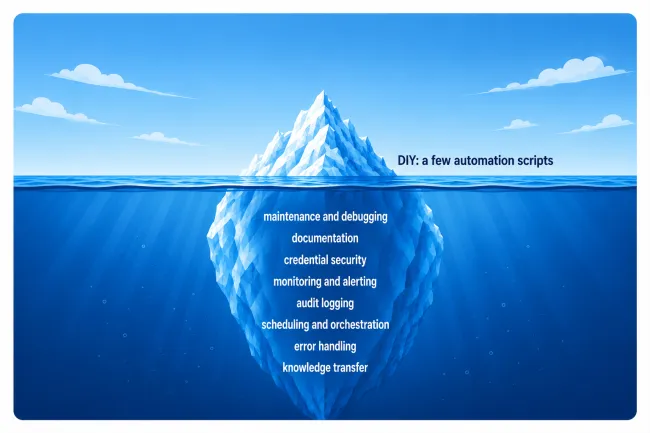
The hidden cost of building in-house
What you see is building a few scripts.
A lot more work is involved to maintain a production workflow.
Where the difference shows up
Four places where the in-house approach and the Fortra Automate platform diverge once automation moves beyond a few scripts.
Predictable platform cost, not compounding maintenance
In-house automation can be cost-effective at small scale. As the automation portfolio grows, the cost of building, debugging, documenting, and maintaining scripts compounds, often faster than the organization expects. Fortra Automate provides predictable, all-inclusive licensing that scales with your program.
Transferable platform skills, not siloed knowledge
When the developer who built the scripts leaves, the knowledge often leaves with them. Undocumented code, siloed knowledge, and "works on my machine" patterns create single points of failure that show up at the worst possible moments. Fortra Automate is a standardized platform with transferable skills. New team members can maintain existing workflows without inheriting siloed knowledge.
Built-in compliance and audit, not retrofitted security
In-house scripts often run without logging what changed, when, or who initiated it. In regulated industries, auditors ask "what ran and what did it touch?" and scripts cannot always answer. Fortra Automate provides built-in audit trails, role-based access control, and a self-contained credential vault for every workflow execution.
Day-one deployment, not weeks of infrastructure building
In-house automation requires assembling separate tools: schedulers, credential vaults, monitoring dashboards, retry logic, and orchestration layers. Each one is its own deployment, configuration, and maintenance commitment. Fortra Automate ships these capabilities together as one platform on day one.
Where each platform sits on the things that matter
Two factors drive enterprise automation success: predictable cost as your program scales, and time to first production workflow. In-house automation and most other approaches sit in the variable-cost zones. Only Fortra Automate is in the top-right corner of both.
At a glance: Building in-house vs Fortra Automate
The seven differences worth knowing before you book a deeper conversation. The full feature-by-feature breakdown is in the downloadable comparison.
| Building in-house | Fortra Automate | |
|---|---|---|
| Best for | Targeted, isolated scripts owned by the team that built them | Business-critical automation requiring governance and scale |
| Total cost | Low at small scale; compounds with portfolio growth | Predictable, all-inclusive licensing |
| Knowledge transfer | Key-person dependency on the developers who built it | Transferable platform skills across team members |
| Audit and compliance | Custom-built, retrofitted after the fact | Built in for SOX, HIPAA, GxP, and similar frameworks |
| Credential security | Often hard-coded or stored in plaintext config | Self-contained on-prem vault with AES-256 encryption |
| Orchestration | Cron, Task Scheduler, or assembled from separate tools | Full scheduling engine included in every SKU |
| Scale | Architectural rewrite often required to grow | 1 to 1,000 automations without architectural change |
How Nationale-Nederlanden put 100+ workflows into production while keeping their PowerShell scripts
Nationale-Nederlanden consolidated manual processes onto Fortra Automate in weeks, wrapping their existing PowerShell scripts inside governed workflows rather than rebuilding them from scratch.
Nationale-Nederlanden (Spain)

Insurance · Spain
Nationale-Nederlanden's IT team had been running an in-house automation program built on PowerShell and .NET to exchange financial information across banks, insurance companies, and providers. When the original developer left, the team discovered the automations were undocumented. The disparate applications underneath still required manual orchestration that consumed time the team didn't have. The choice was to start over from scratch or find a way to consolidate without throwing away what worked.
They consolidated onto Fortra Automate and re-used the existing PowerShell scripts inside the platform rather than rebuilding them. Disparate applications across SharePoint, SQL Server, Oracle, Active Directory, Azure, and AWS are now centralized in a single workflow layer with documentation, audit trails, and role-based access. "In just weeks, they transformed their old, manual processes into new with RPA and centralized their disparate business applications," said Roberto Veronesse, IT Specialist. Today, 100+ RPA workflows run in production, and what used to be siloed knowledge is now codified in the platform.