Key Takeaways
- Scale automation across the organization: Fortra Automate Enterprise helps teams centrally manage robotic process automation across departments, systems, and environments.
- Build workflows without coding: No-code workflow design makes it easier to create reliable automations without heavy developer involvement.
- Run automations across distributed environments: Distributed bot execution helps teams automate processes across multiple systems while maintaining centralized control.
- Improve productivity and reduce manual work: Enterprise automation helps teams eliminate repetitive tasks, reduce delays, and keep critical processes moving.
- Strengthen governance and ROI: Enterprise-grade management features support faster implementation, stronger oversight, auditing, and quicker return on automation investments.
Scale Enterprise Automation Without Rebuilding
Fortra Automate Enterprise plans are built to scale with your business needs. Start with the right mix of agents, environments, and support for your current automation program, then expand as more teams, workflows, and departments come online. As your robotic process automation program grows, you can add execution capacity, development access, testing environments, and dedicated guidance without rebuilding your automation foundation.
Compare
Plans
Core
Best for: One team automating their workflows across everyday systems and databases, with security controls built in.
Connect
Best for: Automations across multiple teams that need broader platform access and stronger operating controls.
Scale
Best for: Organization-wide automation requiring higher capacity, continuity, and formal governance and auditing.
- Workflow Designer
- Automate Recorder
- Role-Based Security
- Multi-Factor Authentication
- Operational API: trigger, run, monitor
- Revision Management
- Audit Tracking
- Quickbooks
- Gemini
- Claude
- ChatGPT
- HubSpot
- Jira
- ServiceNow
- Salesforce
Production
2 agents
Production
+ 1 non-production
3 agents
Production
+ 1 non-production
+ 1 HA/DR
5 agents
Standard Service
Standard Support
Ticket via Automate Support Portal
Automate Care
Dedicated Technical Account Manager
Monthly Professional Services Advisory Session
Upgrade Assurance
Annual Automate Upgrade Included
Core Actions
Broad automation catalog to automate your business processes.
70+ included with every plan
- Excel
- FTP
- Active Directory
- Amazon S3
- Dynamics 365
- SharePoint
- PowerShell
Full Core Actions list
70+ Core Actions included in Core, Connect, and Scale
Data & Documents
- Array
- Dataset
- Excel
- Image
- JSON Object
- OCR
- OpenDocument Spreadsheet
- Text
- XML
Files & Content
- Compression
- File System
- FTP
Business Systems
- Active Directory
- Dynamics 365
- Dynamics CRM
- Exchange
- SharePoint
Cloud & Infrastructure
- Amazon DynamoDB
- Amazon EC2
- Amazon RDS
- Amazon S3
- Amazon SES
- Amazon SimpleDB
- Amazon SQS
- Azure Storage
- VMware Guest
- VMware Host
Web & APIs
- AS2
- HTTP
- Web Browser
- Web Browser (Legacy)
- Web Service
Desktop & UI Automation
- Clipboard
- Dialog
- Input
- Interactivity
- Window
Workflow & Control
- Automate Schedule
- If
- Label
- Loop
- Select
- Task
- Timer
- Type
- Variable
- Wait
System, Security & Scripting
- BASIC Script
- Computer
- Cryptography
- Database
- DDE
- DLL
- Environment Variables
- Event Log
- Machine Learning
- MSMQ
- Multimedia
- Network
- PowerShell
- Printer
- Processes
- Registry
- Run
- Security
- Services
- SNMP
- Speech
- Terminal
- WMI
Custom Actions
Custom automation beyond the included catalog.
Custom Action framework included with every plan
Build your own actions to support new applications as your business needs evolve.
Studio Access
A visual workspace for building and maintaining automations.
Unlimited Studios included with every plan
Equip your whole team to turn repetitive work into practical automations that improve efficiency across the business.
Fortra Automate Enterprise Delivers Fast ROI
See how organizations use Automate Enterprise to turn enterprise automation from isolated task automation into measurable business outcomes. With scalable enterprise automation software, teams can reclaim hours, deploy workflows across departments, reduce manual errors, and build a foundation for repeatable robotic process automation.



RPA Software That’s Easy to Build, Manage, and Scale
Fortra Automate Enterprise is RPA software built to manage complex workflows across teams, systems, and environments. Use enterprise automation software to design, schedule, monitor, and secure automations from one centralized platform while giving teams the flexibility to automate desktop, web, data, IT tasks, and other business processes.

Centralized Management
Manage all workflows, agents, schedules, and users from a single Server Management Console across your distributed network.

Workflow Designer
Visual drag-and-drop builder with conditional logic, error handling, and reusable components for even the most complex processes.

Distributed Execution
Deploy attended or unattended automations across multiple machines with concurrent execution and no restrictions on how tasks run.

Enterprise Security and Auditing
Role-based access down to the workflow level, secure credentials, encrypted variables, and complete process audit logs.

Automate Recorder
Empowers UI-driven automation without writing a single line of code, and provides the right balance of flexibility and power for real-world, complex recordings for desktop and browser-based applications.

Revision and Recycle Bin
Version control allows you to compare version differences, restore previous versions, and recover deleted objects from the recycle bin.
Reduce Manual Work Across the Enterprise
From finance and operations to IT and compliance, Fortra Automate Enterprise helps organizations automate the processes that keep the business moving. Use enterprise automation to connect applications, process high-volume data, reduce manual handoffs, and standardize work across regulated, distributed, or fast-growing environments.









Product Specs for Automate Enterprise
Key Features
- Drag-and-drop task development
- Event-based triggers and conditions
- Database connectivity
- Event and task execution logging
- Error condition handling and recovery
- Multi-machine execution
- Simulated-user application interaction
- Machine learning capabilities
- Credential management
- And more
Native Actions
Build automation quickly with drag-and-drop task development and over 70 easy-to-use native actions and hundreds of sub-actions for common applications like:
- Cloud Services: Amazon Web Services, Windows Azure, VMware
- Microsoft Applications: Active Directory, Excel, Exchange, Dynamics, SharePoint, PowerShell, ML.net
- Web Browsers: Chrome, Firefox, Edge
- Oracle
- MySQL, SQL Server
- XML, JSON
- And more
API Integrations
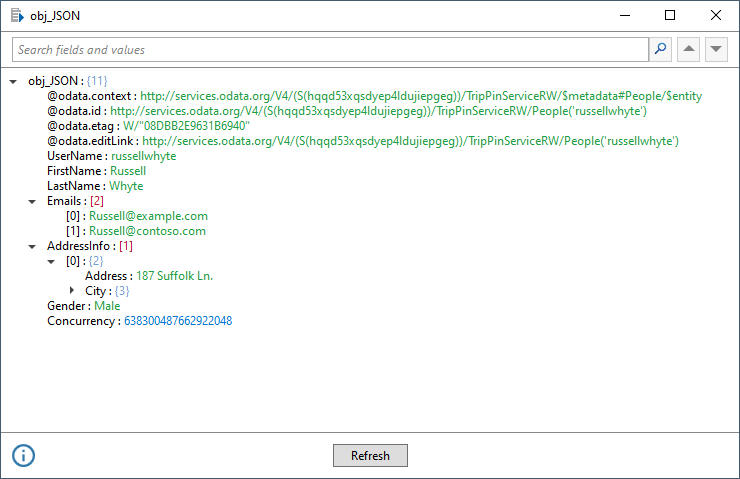
Automate features simplified native API connectivity that masks the complexities of working with APIs. Connect your critical business applications with Automate directly without writing code.
- HTTP/SOAP
- OAuth
- JSON/XML
Watch an On-Demand Demo of Automate
Check out a few short demos to see some sample tasks and get an idea of what Automate can accomplish.
Explore Automate Enterprise Resources



Try Automate Enterprise
Start building scalable automations and see how quickly your team can reduce manual work.