If you’re finding web data collection tasks are taking too much of your time, turn to web scraping tools. By understanding your organization’s needs, the capabilities of scraping tools, and the differences of the options out there, you can more easily choose the best web scraping tools for your business.
What is Web Scraping Software?
Web scraping software extracts data and other information from a website. Web scraping tools automate data scraping and extraction by sending HTTP requests to web servers to retrieve the HTML content on a web page. Then the tool parses and extracts the data needed from the web pages. Organizations use web scraping and screen scraping to speed up manual data gathering and eliminate errors for processes like data analysis, price comparison, or content aggregation to name a few.
Web scraping tools start by making a request to a website server, and then waiting for a response with the text, links, images, and other data to be scrapped. Then, the software parses the web page information and finds the pieces of data the user requested to be extracted. Finally, a web scraping tool moves and transforms the data to be saved in a database, application, or other system for future use.
What to Look for in a Web Scraping Tool
When adding any tool to your tech stack, it’s important to consider the overall value—not just the price tag—it can bring to your organization. This is especially true with web scraping tools. As mentioned above, we’ve covered why screen scraping software is a better option than using code, but as you evaluate your options, ask yourself these questions:
1. What functionality am I getting?
Think about the functionality of the product you need for your web scraping tools. If it’s being used primarily by developers or the IT team, low-code options are a good fit. But if it’s needed for business users, look for screen scraping software with no-code features like drag-and-drop functionality and screen recorders to make building automation easy.
2. Is this a legitimate tool?
There are many rules and regulations to consider when using web scrapers. It’s important to choose a tool that stays within compliance so that any screen scraping complies with applicable laws and respects a website’s terms of service.
3. What are the customer support options?
Support is so important, we’re mentioning it again! Great support is hard to find, especially when trying to scale your web scraping projects. Does the tool you’re looking at offer documentation or training? What level of product support is available? Great support options add to your web scraping tool’s ROI.
4. What else can the tool do?
The goal for any new tool is that it doesn’t contribute to IT bloat. First decide if your organization needs just a web scraper, or if a solution that offers more than just web scraping—like other process automation capabilities—will give you more bang for your buck and not operate in a silo.
5. What is the pricing structure?
It’s important for any new software tool to not only deliver ROI, but scale without adding too much cost. Web scraping tools offer many types of pricing models based on number of pages scraped, number of API calls, or subscription-based models. Make sure the pricing model of any potential web scraping software can meet your needs while allowing room to grow.
Easy-to-Use Web Scraping with RPA
A robotic process automation (RPA) tool that has robust web scraping capabilities is a great option if you’re looking for a more comprehensive software option. RPA bots can mimic the user interactions done on a web page to provide data scraping capabilities that can be used as part of larger automated workflows throughout your enterprise.
RPA streamlines repetitive, rule-based tasks, and integrates disparate systems together so once you scrape data, you can automatically transform and load it in the correct format to the right applications. Web scraping with RPA tools can scrape data from more dynamic web pages and applications, read table data structures, inject JavaScript, and directly access source code.
Benefits of Using RPA for Web Scraping Software
In addition to saving time, reducing errors, and streamlining processes, using web and data scraping tools come with many advantages over using Python or other scripts and code for web scraping:
- User-Friendly Interfaces
Web scraping tools are built with varying levels of user accessibility to provide scraping capabilities to citizen developers and business users through no-code automation. - Automated Workflows
With automated features, the best web scraping tools have broader website automation capabilities that can provide the ability to automate and schedule jobs to run at specific times to get you the most up-to-date data. - Better Data Management
Unlike coding, web scraping tools don’t just extract data from websites, but they also can transform the data to make it more usable in the format of your choosing like CSV, Excel, JSON, or more. - Handle Dynamic Content
Web scraping software can get information from websites that code typically struggles to handle. Such as more dynamic content on JavaScript-heavy websites and other more modern website features. - Easier Scaling
Custom code has limits when you need to scale up your web scraping efforts. And if a coder retires or leaves the company, you could have to start from scratch. Web scrapers can provide more efficiency by letting you reuse workflows to handle more incoming data. - Support Options
When an issue arises with custom code, there’s no one to turn to except yourself. With web scraping tools, get access to documentation and a support team willing to step in and help when needed.
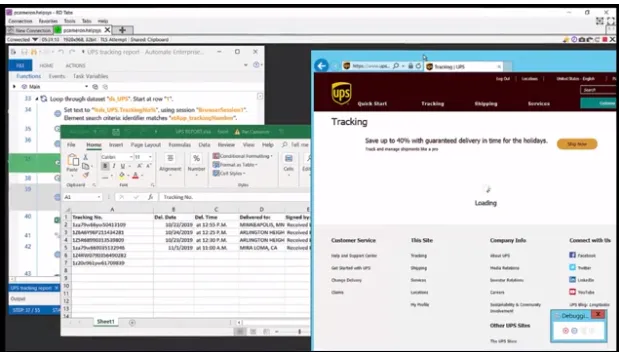
When looking through the options for best web scraping tools, consider Automate. Automate’s RPA capabilities fulfill your web scraping needs—and more—and is built for employee-driven, enterprise-wide automation. Not only does Automate provide a scraping tool, but it also transforms web data without adding additional tools. Information can go directly from a website and into an Excel file, uploaded into your ERP, any database, or other systems and applications.
Automate integrates with web services and can navigate through webpages to interact with web data by initiating searches and logins, entering data, clicking through links, and extracting tables and entire webpage source information. This happens through a native action library with specific actions for web browsers, HTTP, XML, and other web services, that can be invoked without writing a line of code—for a user-friendly approach that brings automation to everyone.
Automate features a powerful API integration kit that connects your most critical apps along every step of your data processes—whether that’s web scraping, data entry, ETL, or more. With drag-and-drop capabilities, 70+ native actions to applications including Microsoft, FTP, OCR, AWS, and more, Automate is powerful enough for IT, yet easy enough for citizen developers. Plus, a robust screen recorder lets users easily create recordings for DIY, no-code, UI-driven automation. The recorder gives you the ability to build, edit, and update screen recordings for both desktop and browser-based applications. And you can add logic and non-UI actions to recordings for the right balance of flexibility and power.
Want to Try Web Scraping Software?
Download a free trial of Automate to see how you can transform web scraping processes and beyond.